Back in November, I was offered a CarpodGo T3 Pro for review. The brief was simple: produce a YouTube review within four weeks of delivery.
It arrived in mid-December.
It is now… not mid-January. Or even late January. Sorry.
I’ve always fancied adding Apple CarPlay to one of my older cars. Ever since it debuted in the Ferrari FF in 2014, it felt like something reserved for premium machinery and high trim levels. Now it’s everywhere, except in the sort of cars many of us actually run.
Which brings me to the 1997 Toyota Camry.
The problem: analogue inconvenience
Fitting the CarpodGo T3 Pro was part of a winterisation project (which, frankly, failed). Its audio situation:
- CD player doesn’t work
- FM radio is patchy
- Cassette player chews tapes
In theory, a double-DIN unit would fit in the space currently occupied by the separate radio/cassette and CD units, but I’m a fan of OEM. I don’t like ripping original dashboards apart unless I absolutely have to.
So I’d been using one of those Bluetooth adaptors that plugs into the cigarette lighter and transmits via FM. It works – up to a point. But:
- Sound quality is inconsistent
- Volume is weak
- My iPhone Pro Massive (or whatever it's called) kept launching itself off the vent mount whenever the Camry failed to take yet another corner with grace and dignity
Retrieving it from the footwell while moving is, quite rightly, illegal. Not ideal.
A dashboard-mounted phone holder would be preferable, but the Camry’s dash design makes that difficult without placing the phone squarely in your field of vision. Also not ideal.
So: CarpodGo T3 Pro.
First impressions: surprisingly premium
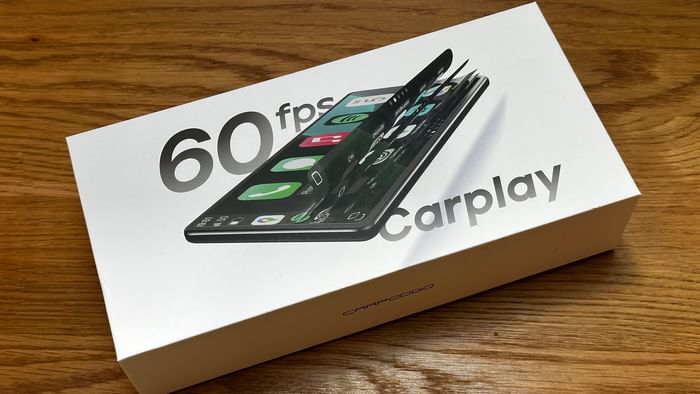
The packaging is excellent and almost Apple-like in presentation and colour. It immediately feels like a serious product rather than a cheap Amazon punt that ends in disappointment.
Inside the box:
- 8.9-inch (227mm x 101mm) screen
- Power lead
- Multiple mounting options
- Various cables
- A surprisingly simple instruction manual
Initially, the number of wires is slightly bewildering, until you realise many are for the optional rear-view camera. Not required here, because the Camry has a tow bar the size of a small harbour wall. Who needs sensors and cameras when that bad boy is bringing up the rear?
Installation: fit it once
There are three audio output methods:
- Via the car’s Bluetooth (Camry doesn’t have it)
- Via AUX (Camry doesn’t have that either)
- Via FM radio (the only option here)
FM is theoretically the least elegant solution. But if it works properly, it works.
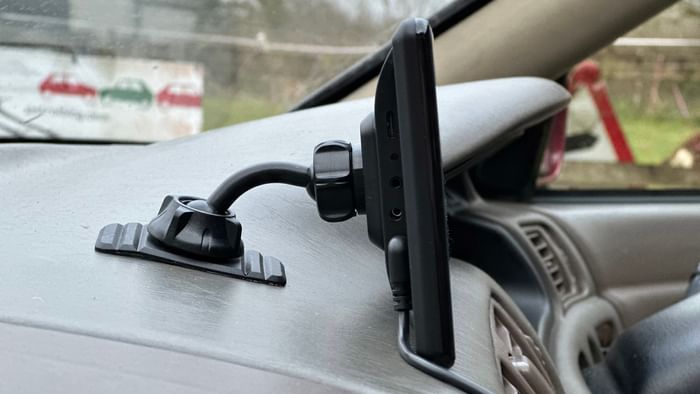
Installation took about 15 minutes. Five of those were spent prising the extremely sticky fixed console mount off the dashboard after I positioned it incorrectly. When CarpodGo says ‘fixed’, it means fixed. The instructions state that the bottom of the screen must be supported by the dashboard, which meant relocating it. Lesson: test placement carefully before committing. And read the instructions.
There is also a glass suction mount, but I’m not a fan for three reasons: it places the unit further from the driver, it looks untidy, and it leaves an unsightly tidemark when removed.
The fixed mount is the better solution – just choose wisely.
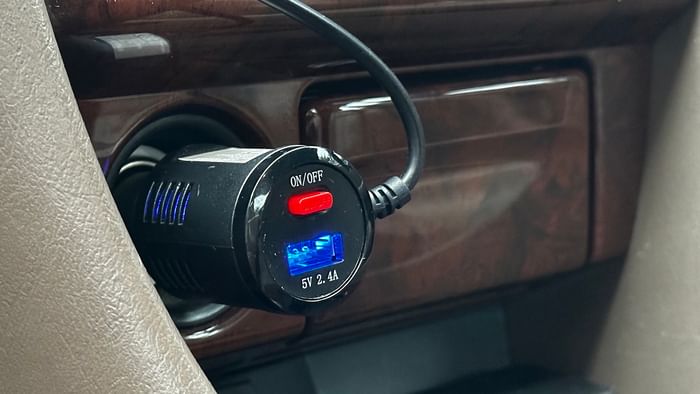
Power is simple: plug the 9V lead into the back of the unit and the other end into the cigarette lighter. There’s also a USB port for charging your phone, though CarPlay itself runs wirelessly via Bluetooth.
To set up:
- Select an FM frequency on the unit
- Tune your radio to match
- Pair your phone via Bluetooth
Done. Isn't it great when things work the first time?
On the road: does FM ruin it?
Short answer: no. The sound quality is noticeably better than my old Bluetooth-to-FM adaptor. It’s very close to OEM. Admittedly, OEM filtered through 29-year-old Toyota speakers with mould on the plastic covers – but still OEM.
Startup is quick, taking around 15 seconds from ignition to full sync; there’s no need to reconnect manually each time. It has failed to sync twice – once on startup and once while driving – but these appear to be isolated incidents. Overall reliability has been strong after two months of use.
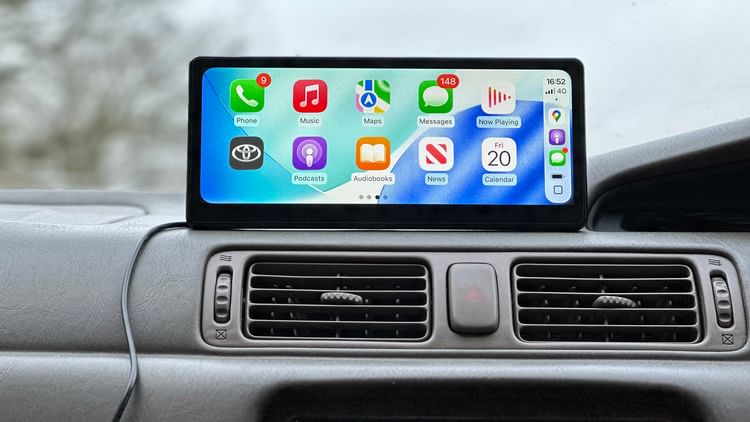
The 8.9-inch screen is a good size for an older dashboard. The display is sharp, the 60fps refresh rate makes scrolling smooth, and it doesn’t feel laggy or compromised. And yes, you can change the loading screen logo. Naturally, I chose Toyota, but you could select Lamborghini, Ferrari or Wartburg.
I may have lied about the last one.
The reality of living with it in a beige Camry
Two downsides:
1. Wires
The visible wiring isn’t beautiful. In a black or grey interior, it would be far less noticeable. In Werther’s Original beige, everything stands out. I’ll attempt to tuck the leads behind the dashboard to improve matters.
2. Sunlight reflection
The Camry dates from an era when cars were essentially greenhouses. Combined with acres of beige dashboard plastic, reflections are noticeable in bright light. Again, this is partly environmental rather than a flaw with the unit itself.
Value
At around £150, the T3 Pro represents strong value, especially if:
- You want CarPlay in an older car
- You don’t want to modify the dashboard
- You swap cars regularly (use the glass mount for this!)
- You prefer reversible upgrades
It won’t ever look factory-fit. But it also doesn’t feel like a cheap workaround. And in the Camry, it works in conjunction with an electric aerial – two eras of tech in perfect harmony.
Verdict
I’m a big fan – hence the review. In a 1997 Camry, it feels like bringing the car forward three decades without losing its originality. Navigation works properly, streaming is seamless and the phone stays put.
For older cars with limited audio options, even FM-only setups, it’s a genuinely practical solution.
Rating: 4.5/5
Practical, well-built and surprisingly polished – just give yourself some extra time to tidy the wiring.
CarpodGo T3 Pro: Key specs
- Screen size: 8.9-inch (227mm x 101mm)
- Resolution: 1920 x 720
- Refresh rate: 60fps
- Connectivity: Wireless Apple CarPlay and Android Auto
- Audio output: Bluetooth, AUX, FM transmitter
- Power: 12V socket
- Price: £149 plus postage